brew cleanup on Mac: Clear Cache, Old Versions, Autoremove
Homebrew manages old versions and cached downloads more actively than it once did. Unless automatic cleanup is disabled, installs and upgrades clean the formulae they touch, and Homebrew periodically cleans all formulae. A long-lived installation can still accumulate downloads, pinned versions, build artifacts, and dependencies. Inspect Homebrew's own metadata before deleting anything under its prefix.
What Homebrew keeps around
Three kinds of leftovers build up:
- Old versions. Cleanup normally removes superseded versions, but retained or recently upgraded versions may remain in the Cellar for a time.
- Downloaded archives. Every bottle and cask download is cached in Homebrew's cache, kept to avoid another download.
- Unused dependencies. Current Homebrew cleanup and uninstall operations normally remove formulae that are no longer needed, unless automatic removal is disabled. Older installations or interrupted operations can still leave some behind.
See the download cache size directly:
brew --cache
du -sh "$(brew --cache)" 2>/dev/null
Cleaning it up
The main command removes old versions and prunes the download cache in one step:
brew cleanup
The current Homebrew manual
says ordinary cleanup removes old installed versions and downloads older than 120
days by default. HOMEBREW_CLEANUP_MAX_AGE_DAYS can change that window. Use -n
for a dry run. The deeper -s mode scrubs more cached downloads while retaining
downloads for currently installed formulae and casks:
brew cleanup -n
brew cleanup -s
Homebrew cleanup and uninstall now remove unused formula dependencies by default.
brew autoremove remains useful when you want to inspect that dependency decision
directly:
brew autoremove --dry-run
brew autoremove
brew list shows installed packages and brew outdated shows pending updates. Use
brew --cellar, brew --caskroom, and brew --cache to discover paths instead of
hardcoding /opt/homebrew; Intel and Apple silicon installations differ.
Measure the three stores separately
One total hides three different decisions. Record the installed formulae, cask metadata, and download cache before cleanup:
du -sh "$(brew --cellar)" "$(brew --caskroom)" "$(brew --cache)" 2>/dev/null
A large cache is the easy reclaim because Homebrew can download those files again. A
large Cellar is mostly installed software, so cleanup can remove only superseded
versions. A large Caskroom does not mean the app bundles themselves live there; cask apps
usually sit in /Applications. Run the same command afterwards and attribute the change
to the store that actually shrank.
Safe by design
Homebrew cleanup is lower risk than deleting Cellar directories by hand because it uses version and dependency metadata. It can still remove a rollback version or a cached bottle you expected to use offline. Preview both cleanup and autoremove, and keep pinned or operationally critical versions intentionally.
Under the hood: the Cellar, the Caskroom, and how cleanup decides
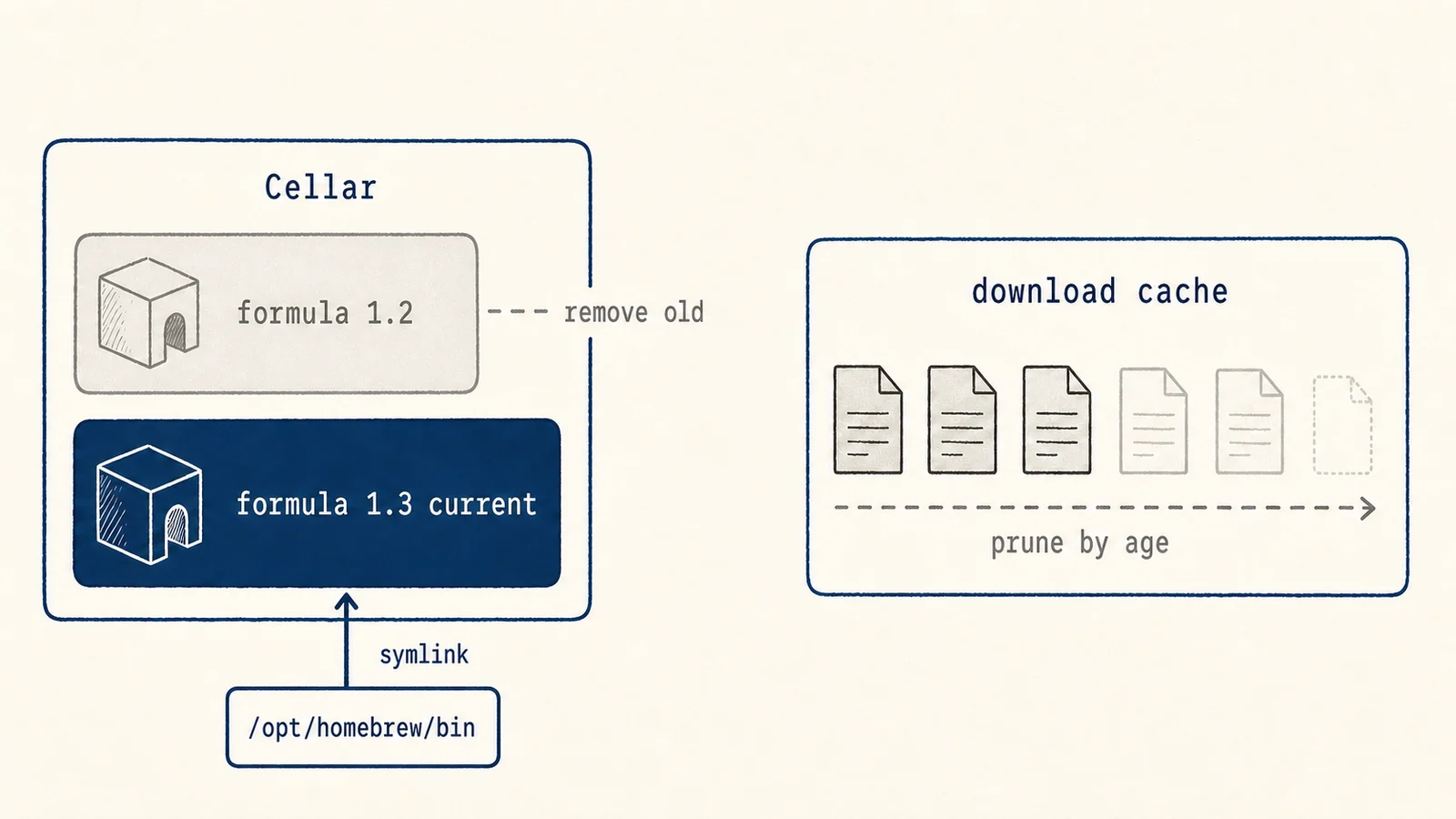
Homebrew installs each formula into a versioned directory in the Cellar reported by
brew --cellar, then links the active version into its prefix. Upgrading places the
new version alongside the old before repointing the symlinks. Casks keep versioned
metadata under the Caskroom while their app bundles commonly live in /Applications.
Downloads use the path reported by brew --cache and are retained according to
Homebrew's policy. brew cleanup uses installed-version, retention, and dependency
metadata rather than simply deleting every non-current directory. brew autoremove
exposes the dependency-only part as a separate command. Because both act on Homebrew's
own records rather than guessing, they are safer and more explainable than manual
folder removal. A preview is still useful on machines that depend on old toolchains or
offline bottles.
Where another tool should stop
A disk map or cleaner can reveal the Homebrew cache and show its size. Mole can surface that category, but Homebrew's own commands remain authoritative for Cellar versions and dependency relationships. Discovery and ownership should not be confused.
A safe order of operations
Use Homebrew's path commands to measure its stores, preview brew cleanup -n, and run
ordinary cleanup before considering -s. Preview brew autoremove separately because
it answers a dependency question, not a cache question. There is no need for a fixed
cleanup schedule when automatic cleanup is working and disk pressure is low.